Get alerts on new judgments (Signaleringen)
This content is not available in your language yet.
Feitlijn follows what Dutch law firms write about new case law. When a firm blogs about a judgment on a topic you follow, you get an email on the next weekday morning: the judgment, a short summary, what the blogs say about it, and links to the full analysis in Feitlijn. No new commentary, no email.
You manage your alerts in Feitlijn under Signaleringen. Alerts are free with every Mino account. You need to be signed in.
Set up an alert
Section titled “Set up an alert”Follow a topic in one click
Section titled “Follow a topic in one click”On a topic page in Feitlijn (for example, click a topic on a case page), click Volg dit onderwerp. Feitlijn creates an alert for that topic and confirms it.
On a case page, the bell next to the topics sets up an alert for those topics.
Or choose topics yourself
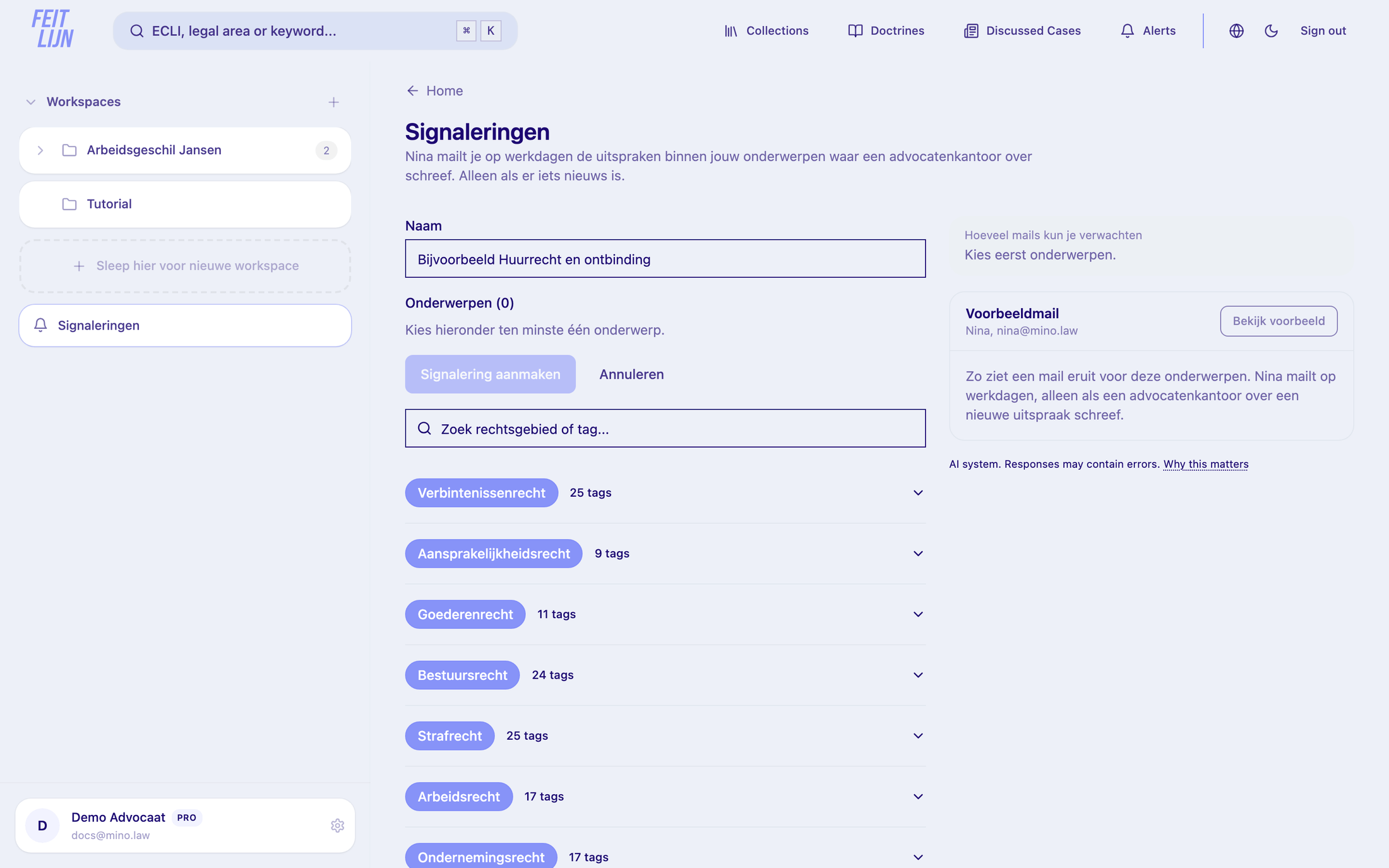
Section titled “Or choose topics yourself”- In Feitlijn, click Alerts (Signaleringen) in the top bar.
- Click Nieuwe signalering.
- Give the alert a name and choose its topics; search for a legal area or topic and click to add it.
- Optionally, click Bekijk voorbeeld under Voorbeeldmail to see what an email would look like, and check Hoeveel mails kun je verwachten.
- Click Signalering aanmaken.
Alerts for a matter
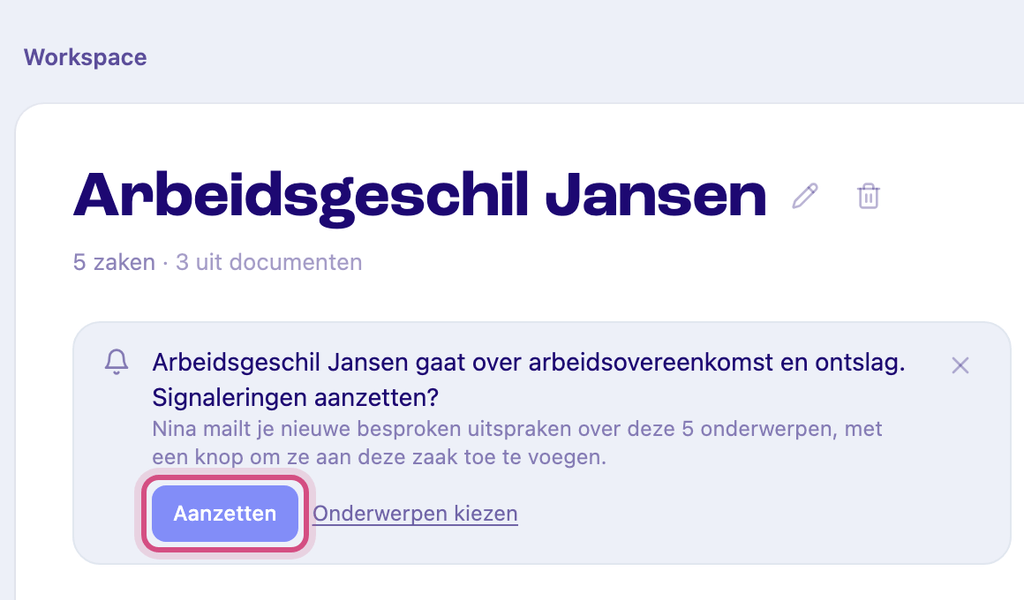
Section titled “Alerts for a matter”An alert can belong to a matter. When you open a matter’s folder in Feitlijn, it may suggest topics based on the matter’s documents: ”… gaat over … Signaleringen aanzetten?”. Click Aanzetten to follow them, or Onderwerpen kiezen to pick them yourself. The emails of a matter alert let you save a judgment straight to that matter. Each alert is personal, also when it’s tied to a shared matter.
Choose topics
Section titled “Choose topics”An alert follows one or more topics: a whole legal area, such as arbeidsrecht, or a specific topic within it, such as ontslag op staande voet. They are Feitlijn’s own legal areas and topics; see Browse by legal area. An alert can have up to 50 topics.
- A legal area catches everything in it; specific topics keep the email focused.
- Hoeveel mails kun je verwachten estimates how often an alert will email you, from rarely to weekly.
When you get an email
Section titled “When you get an email”Feitlijn checks every weekday morning (at 8:00 Dutch time, 9:00 in summer) whether law firms have written about new judgments on your topics since your last email. If they have, you get an email; if not, you don’t.
A judgment makes it into your email when:
- Feitlijn has tagged it with one of your topics;
- a law firm has written about it since your last email (or, for your first email, in the past week);
- it hasn’t been sent to you for this alert before.
What’s in the email
Section titled “What’s in the email”The email comes from feitlijn@mino.law, in Dutch. Its subject is the title of the first judgment.
- Up to five judgments, most-discussed first. Each with its title and ECLI, the court, date and parties, the topics it matched (Relevant voor:), a short summary, what the blogs say (Wat blogs hierover zeggen), the commentary itself (Commentaar) and links to the judgment and to Feitlijn.
- Under Misschien ook interessant: up to two recent judgments on your topics that no firm has written about yet.
- For an alert tied to a matter: + Voeg toe aan zaak saves a judgment to that matter.
- At the bottom: Beheer je signaleringen and Afmelden.
Everything you received
Section titled “Everything you received”In Feitlijn, Signaleringen lists everything you were sent under Ontvangen uitspraken, newest first. Save a judgment to a folder from there. The Feitlijn dashboard shows the latest ones under Nieuwe signaleringen.
Manage your alerts
Section titled “Manage your alerts”All your alerts are under Signaleringen (in the top bar, and in the sidebar with the number of active alerts).
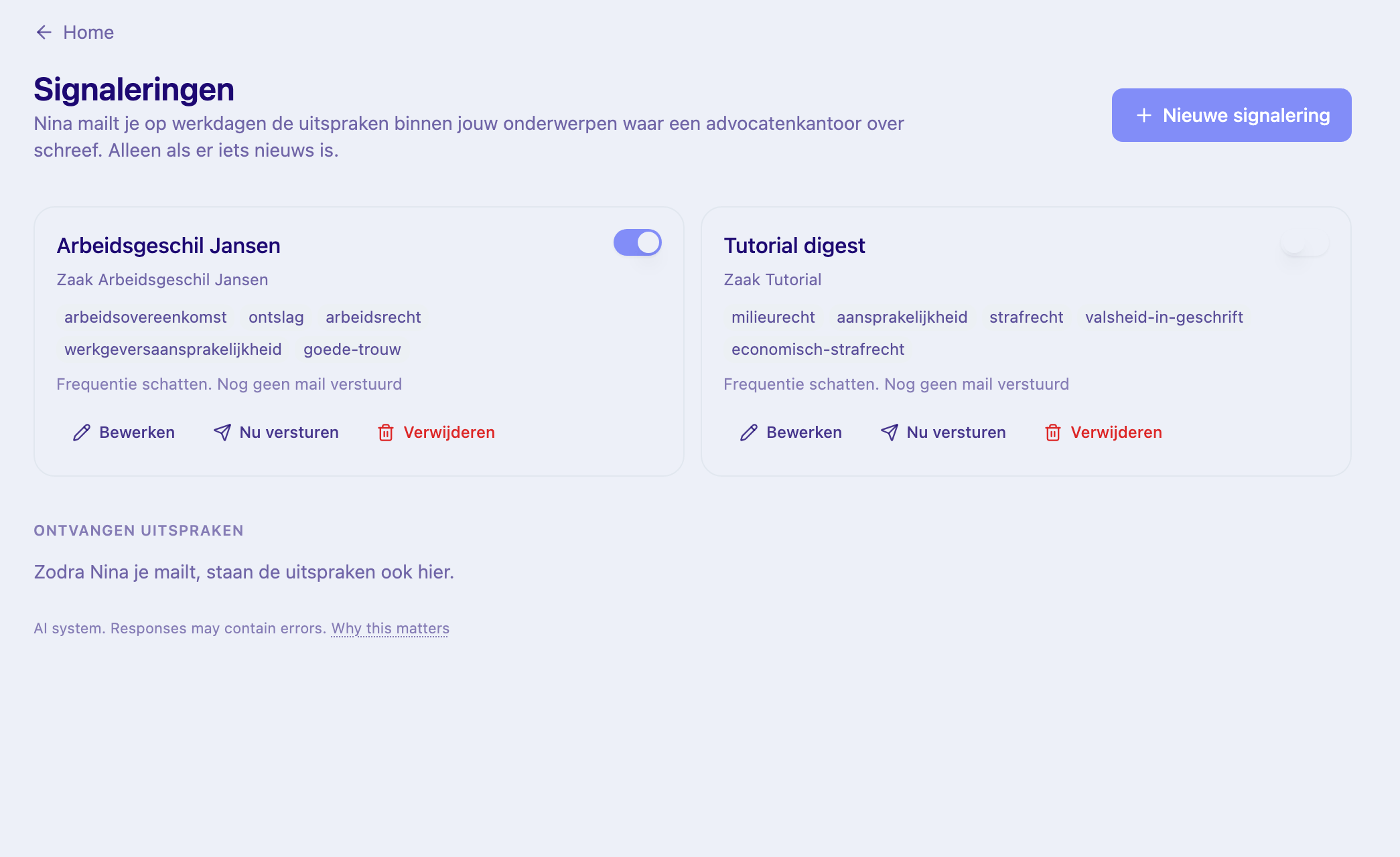
Each alert shows its name and topics, with:
- a switch to pause or resume it;
- Bewerken: change the name or topics, then Opslaan;
- Nu versturen: send the email straight away if there’s something new. It’s a real email: the judgments in it won’t be sent again with the next scheduled email;
- Verwijderen: delete the alert. The judgments you received stay under Ontvangen uitspraken.
To switch all emails off at once, turn off E-mailsignaleringen in your Feitlijn settings. Your alerts are kept; switch it on again to resume.
Not getting emails?
Section titled “Not getting emails?”- Check that the alert is switched on in Signaleringen, and that E-mailsignaleringen is on in your Feitlijn settings. Afmelden in an email switches that alert off.
- You only get an email when firms have written about new judgments on your topics. Add broader topics if it stays quiet.
- Check your spam folder, and add feitlijn@mino.law to your contacts.
Used Nina before?
Section titled “Used Nina before?”Signaleringen used to be a separate agent called Nina, at nina.mino.law. Alerts you set up there are the same alerts and appear under Signaleringen.